Tips and Best Practices
Here are some words of experience on the best way to add and use data in Sytewise.
- Naming Fixtures and Parts
- Grouping Fixtures
- Descriptions Save You Time and Money
- How to Set Up Fixtures and Parts: A Guide to Choose What Works for You
Naming Fixtures and Parts
Why a Naming Convention is a good Idea
What’s in a Name?
Which HVAC Unit needs a new compressor? Maintenance Systems need to keep track of hundreds of Fixtures and their parts, some of which are identical except for their serial number and location. To make sure your staff can easily find and repair the right equipment, build that information into the name of your fixture.
Naming Your Fixtures
The type of fixtures you manage or maintain and the way that you work with them can make a difference on how you choose to name them. Facility Maintenance organizations that work with static location items may choose to include a Property Name or Location in the Fixture Name. Companies that maintain equipment that is mobile may default to a Service Tag or Item Number. Each Company’s naming strategy will be different and the same company may use a different strategy for different fixture types. Here are some features you may want to include:
- Fixture Type Data: HVAC, Hot Water Heater, Lighting Fixtures,
- Manufacturer Data: Make, Model, Serial Number
- Location Data: Address, Tenant Suite, Property, Ownership
- Instance Data: Pole 6, RTU4, Fire Panel 3, etc..
Describing Your Fixtures
Fixture descriptions can offer a lot of detail to the viewer and even short descriptions can be very helpful. A minimum of details would include the type of fixture and any thing that would help identify it such as its age, capacity or function.
An HVAC unit may be described as “ 2010 RTU6, 25 Ton, Gas Pack, 3Phase “
Naming Fixtures Doesn't Needs to Be Hard
The goal of naming your fixtures is to make them easy to find and identify for your employees, vendors, and inspectors. If you are consistent, even a simple naming convention will add lots of value to your work management system. Here are some ideas to guide you as you come up with a naming structure.
- Straight forward: Maintenance technicians should be able to draw meaning from asset names. Don’t name a HVAC Unit as “NUMBER 6.” HVAC,RTU, or COND is simpler and is more valuable to your employee. JCPENNEY RTU 6 is easily understood.
- Consistent: Keeping your naming convention consistent will improve the data your system can provide you. Make sure to be consistent in length and case. Add leading zeros to your numbers if you think a Fixture type may have more than 10, 100, or 1000. If you have 100 fixtures of the same type, the first fixture should include the numbers 001.
- Unique: Each asset name should be unique to prevent confusion.
- Short as Possible: Don’t include information easily found elsewhere
- Allow for Expansion: Make sure you leave room for the addition of new fixtures of the same type. Names that include numbers should allow for future expansion
- Letters over Numbers: Letters can be much easier to interpret for employees and include information that numbers alone just can’t.
Naming Parts
The same common-sense approach applies to naming parts, with some caveats. Manufacturer Part Numbers are specific and very useful if you are managing your fixtures to the component level. Sytewise has a specific field for the actual part number from the manufacturer and you should use this capability as religiously as possible. Keeping actual manufacture part numbers instead of just the title of the part will pay you back in time and money as the system allows you to communicate with manufactures and suppliers to keep your equipment running smoothly.
Additional Reading: CREATING AND MANAGING FIXTURES, ADDING PARTS TO FIXTURES
Grouping Fixtures
Grouping Fixtures is a powerful tool to allow you to look at subsets of fixtures on a property quickly and easily. Looking at lights and want to see just your Pole Lights? Make a group. Looking at HVAC units and want to see just the HVAC units on top of the Walgreens? Make a group. Groups help categorize and locate your fixtures quickly and efficiently. Also, Groups that are created by the administrator are available to Vendors and Surveyors to locate specific fixtures on the Work Order Map.
What are the best ways to Group Fixtures?
- Fixture Type
- Fixture Location
- Fixture Ownership
- Fixture Maintenance Vendor
- Height off Ground
Fixture Type
Grouping all fixtures by type is a great way to keep track of how many of a specific item you have on a property. Pole Lights, HVAC units by type and tonnage, even landscaping material can be grouped by species if it helps your technicians plan for maintenance. It also can make it easy for technicians to survey a specific type of item.
Fixture Location
Fixture Location is a great way to look at a small group of fixtures when you have a large number at a single property. Say you have four to five hundred light fixtures on a property. Looking at a list of all of them to find your pole lights would be daunting. Group all of your Pole lights together and you can easily display just those fixtures and find your specific fixture quickly. Fixture Location is a great way to name your groups also. Show me all the HVAC units on top of the Kroger Grocery Store. That list shortened from 75 in the whole center to the 8 units that are on the Kroger roof.
Fixture Ownership
Fixture Ownership is a great way to group fixtures if you happen to have more than one ownership entity for a property location and the division of maintenance is based on parcels or areas of the property. If a property is divided into Phases and each phases has different ownership or maintenance entities, this is a great way to group fixtures and easily export those that belong to or maintained by one group over the other.
Fixture Maintenance Vendor
Not all Fixtures of a certain type are maintained by the same vendor. Grouping Fixtures by the Maintenance Contractor that services them makes it easy to keep track of the units associated with the vendor in question.
Fixtures By Height
The height of Fixtures is baked into how Fixtures are entered into our system. It is a great way to know what type of vendor you should send to maintain a specific Fixtures, and what type of equipment they will need to reach it if it is a good distance off the ground.
Any other Category that Makes sense to You
There are any number of ways of categorizing Fixtures that will make sense to you with your Fixtures on your Properties. If you ever need to see a Group of Fixtures as a subset of the whole, then save it as a Group. Any individual Fixture can be a part of several groups. Making Groups is simple and they are easy to recall when you need them.
How To Group Fixtures
Grouping fixtures is an easy. Use the following steps to create a Group:
- Select the Fixture or Fixtures you want to Group using the Square Check Box to the right of the Fixture Name.
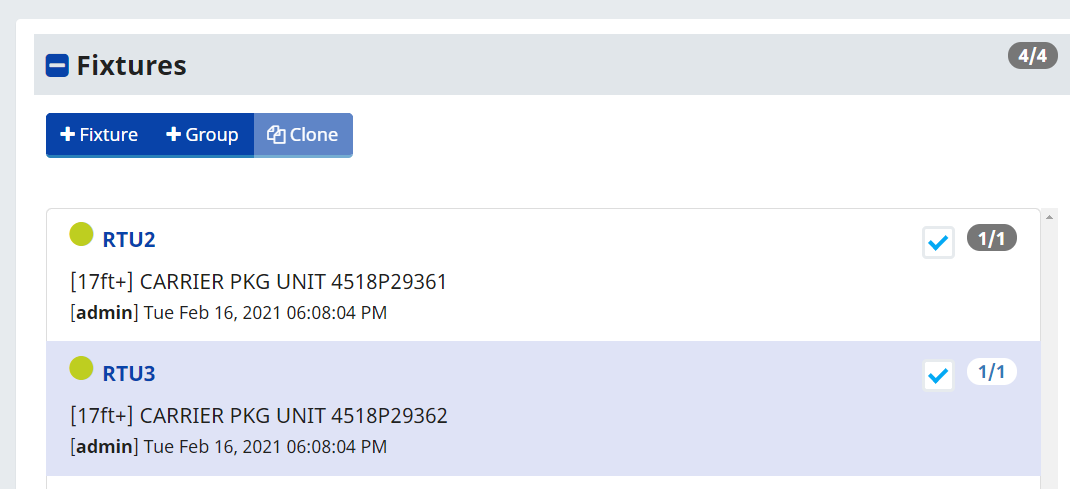
- Click the +Group button at the top of the Fixture List.
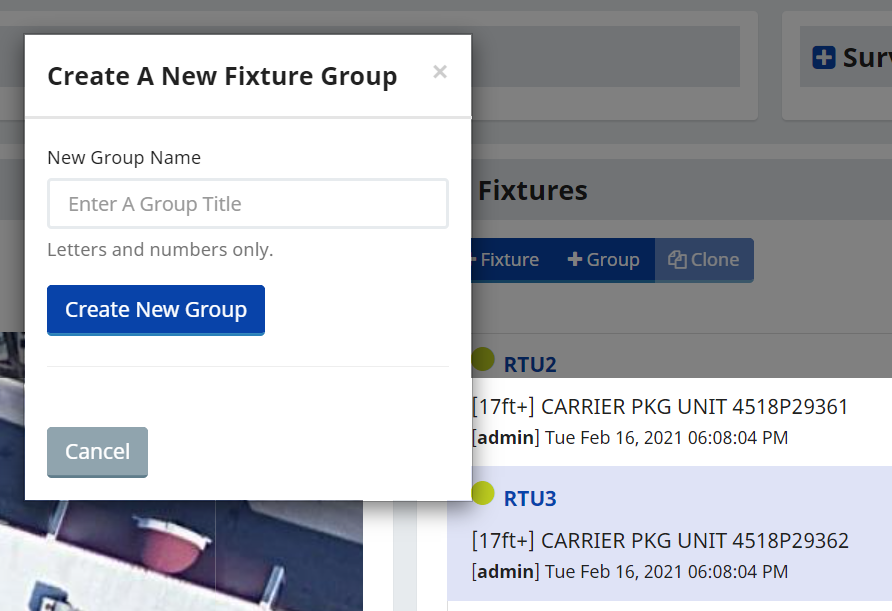
- Enter the Name your new Group and click on the Create New Group button
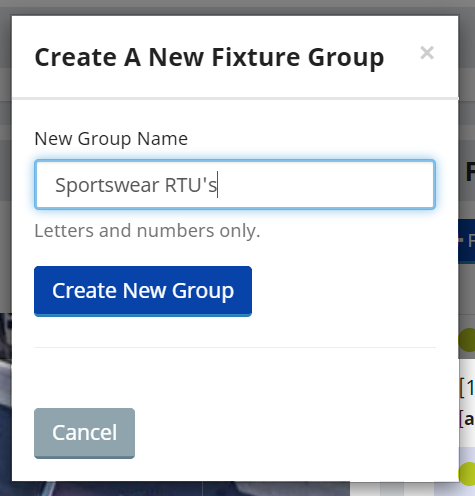
Your new Group is done and already includes any fixtures you selected when making the Group. You only need to select one fixture to create a Group. You can add any other Fixtures you create to existing Groups.
If you Clone a Fixture that is part of a Group, The Clone will also be added to the same group, automatically. It is good practice if you are creating a Fixture that you are going to Clone and add to a Group, go ahead and use your first Fixture to Create the Group. Any Clones will already be a part of the group automatically.
Additional Reading: CREATING AND MANAGING FIXTURES
Descriptions Save You Time and Money
Searching for a specific type of fixture across your portfolio used to take a lot of time and guesswork. Sytewise can help you recall these fixtures in minutes without the guesswork, and fixture descriptions are the biggest part of what makes that possible.
The Detail Work
The more meaningful detail you put into a fixture description, the more visible that fixture becomes across your entire portfolio. Being able to pull up every fixture of a particular manufacturer, type, model, age, or location is not just a convenience -- it changes how you manage your properties. Subsets of fixtures that used to require a spreadsheet, several phone calls, and a fair amount of hoping someone remembered correctly can now be surfaced in a search that takes seconds. That visibility has direct operational value. You catch patterns earlier, plan maintenance more accurately, respond to service bulletins faster, and have honest conversations with clients and vendors based on what is actually installed rather than what you think is installed. Better data means better decisions, and better decisions mean better performing properties.
The Payoff
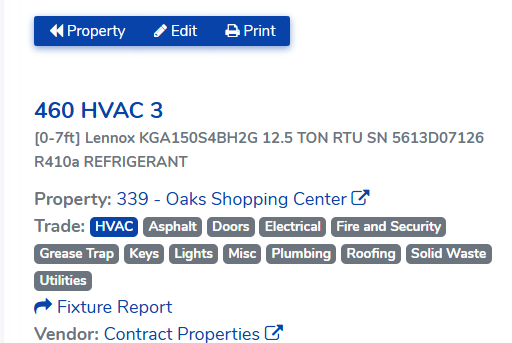
By giving an HVAC unit the description Lennox KGA150SVBH2G 12.5 TON RTU SN 5613D07126 R410a Refrigerant, you can now search your entire portfolio by manufacturer, model number, serial number, tonnage, rooftop versus ground mount, and refrigerant type. Search for Lennox and it appears. Search for 12.5 TON and it appears. Search for R410a and it appears alongside every other unit in your portfolio running that refrigerant. One well-written description makes a single fixture findable six different ways across every property in your account.
That matters when a refrigerant is being phased out and you need to know your full exposure. It matters when a manufacturer issues a service bulletin and you need to know which properties are affected. It matters when you are negotiating a service contract and need an accurate count of what is in scope. And it matters when you are planning capital replacements and want to know how many units of a particular age and type are still in service.
Different fixture types will call for different details. Make, model, and serial number are always a good starting point. Beyond that, think about what characteristics you are most likely to search for across your portfolio and include those. Tonnage and refrigerant type for HVAC. Screen size and resolution for displays. Lamp type and wattage for lighting. The test is simple -- if you might ever want to find every fixture like this one, put that detail in the description.
How to Set Up Fixtures and Parts: A Guide to Choose What Works for You
Every system you manage in Sytewise starts with the same question: how deep do you want to go?
That question isn't rhetorical. The answer shapes how you set up your fixtures and parts, how your maps look, what your vendors see when they arrive on site, and whether your reference articles light up at the equipment level or the system level. Get it right and Sytewise becomes a genuinely powerful service management tool. Get it wrong and you'll spend an afternoon reorganizing things you set up in a hurry.
Let's walk through the options using a real example: a Conference Room AV System. It could just as easily be a building automation system, a lighting control network, or a security system -- the logic is identical. But AV is a good sandbox because most of us have stood in a conference room and counted the pieces.
The system: Conference Room AV
For our example, the system lives in a single conference room and includes five pieces of equipment: a monitor, a DVD player, a projector, an electric screen, and a control system. Five distinct pieces of hardware, one room, one purpose. How should they live in Sytewise?
The answer depends on three questions:
- Do you need to locate each piece of equipment separately on a map or floor plan?
- Do you need to track internal components -- things like a projector lamp -- at the maintenance level?
- Do you want Reference Article support tied to each individual piece of equipment?
Your answers will point you to one of two approaches.
Approach one: The system as a single fixture
If you manage AV systems to the system level -- meaning you dispatch a vendor to service the whole room, you track the system as a unit, and you don't need to pinpoint individual pieces of equipment on a floor plan -- then the cleanest setup is a single fixture.
Create one fixture called "Conference Room AV System."
Then add each piece of equipment as a part of that fixture:
- Monitor (make, model, serial number)
- DVD Player (make, model, serial number)
- Projector (make, model, serial number)
- Electric Screen (make, model, serial number)
- Control System (make, model, serial number)
Each part carries its own make, model, and serial number, so you have full documentation of what's in the room. Warranty lookups, replacement ordering, and service history all live on the fixture record. The entire system gets a single map marker, which is clean and uncluttered.
This approach works beautifully when:
- Your vendors service the system as a whole
- You don't need component-level maintenance tracking (no projector lamp replacement schedules, for example)
- One map pin for the room is all you need
The tradeoff is that Reference Articles in Sytewise are written at the fixture level, not the part level. So if you want a Reference Article for your projector -- installation notes, configuration specs, the vendor's quirks -- the projector needs to be a fixture, not a part. In this approach, your reference articles cover the system as a whole, not the individual pieces. If you install many duplicate systems, write a reference article for the entire system and let it support every location you install.
Approach two: Each piece of equipment as its own fixture
If you need to locate equipment separately on a floor plan, track internal components like a projector lamp, or attach Reference Articles to individual pieces of equipment, then each piece of equipment should be its own fixture.
In this setup your property might be labeled something like "2022 Smith Street - Conference Room" (more on that in a moment), and your fixtures look like this:
- Monitor
- DVD Player
- Projector
- Electric Screen
- Control System
Each fixture gets its own map marker, its own parts list, its own service history, and its own Reference Articles. The projector fixture, for example, can carry a part called "Projector Lamp" with a replacement schedule. The control system fixture can have a Reference Article with programming notes and reboot procedures.
Here is where the map gets interesting. Instead of placing these fixtures on a satellite view, you can use a floor plan image as the map background. That means each fixture marker lands on the actual floor plan of the conference room, showing management and vendors exactly where each piece of equipment lives. That is genuinely useful when a technician is standing in a building they have never been in before.
Group these fixtures together under a fixture group called "Conference Room AV System." Grouping lets you manage all five fixtures as a named system within the property, dispatch work orders against any fixture in the group, and keep the system organized as your portfolio grows.
This approach works beautifully when:
- You need component-level maintenance tracking
- Vendors need to locate specific equipment on a floor plan
- You want Reference Articles written at the equipment level
- You manage multiple systems on the same property and want them organized separately
A note on property naming when you go deep
Here is something worth knowing: in Sytewise, multiple properties can share the same address. That is not a bug -- it is a feature.
If you manage several AV systems at 2022 Smith Street and you want to maintain each one to the component level, you can create a separate Sytewise property for each system:
- 2022 Smith Street - Conference Room AV System
- 2022 Smith Street - Lobby Digital Signage
- 2022 Smith Street - Executive Boardroom AV System
Each property gets its own set of fixtures, its own floor plan, its own vendor assignments, and its own service history. They all share the same physical address, which causes no confusion in the system whatsoever. It is a clean way to separate complex installations at the same site without tangling their records together. If you want all of your Systems as one Property, then add the component for each system to the same property, and use fixture grouping as a way to assign each piece of equipment to the right system.
How to decide
If you find yourself staring at a blank property and wondering which approach to take, here is the honest one-sentence answer: set up fixtures at the level you want to manage them.
You can use both methods across your portfolio, but you should consider how you want to search for equipment. If you need to do portfolio searches for a specific model number that has been discontinued and needs a replacement, make sure you know how to get to each instance of that equipment. To keep your data easily accessible and the most impactful, I recommend standardizing on a method,
If a projector is something you service as part of a room, it is a part. If a projector is something you service on its own schedule, with its own lamp replacement history and its own reference documentation, it is a fixture.
The same logic applies to any system you manage -- HVAC, building automation, security, fire suppression. The platform does not care what the system is. It cares how granular you want to get.
Get that question right and everything else follows naturally.